

Overview
Installing Tag Insight takes about 5 minutes. You’ll need help from your web developer or tag management team to complete the installation.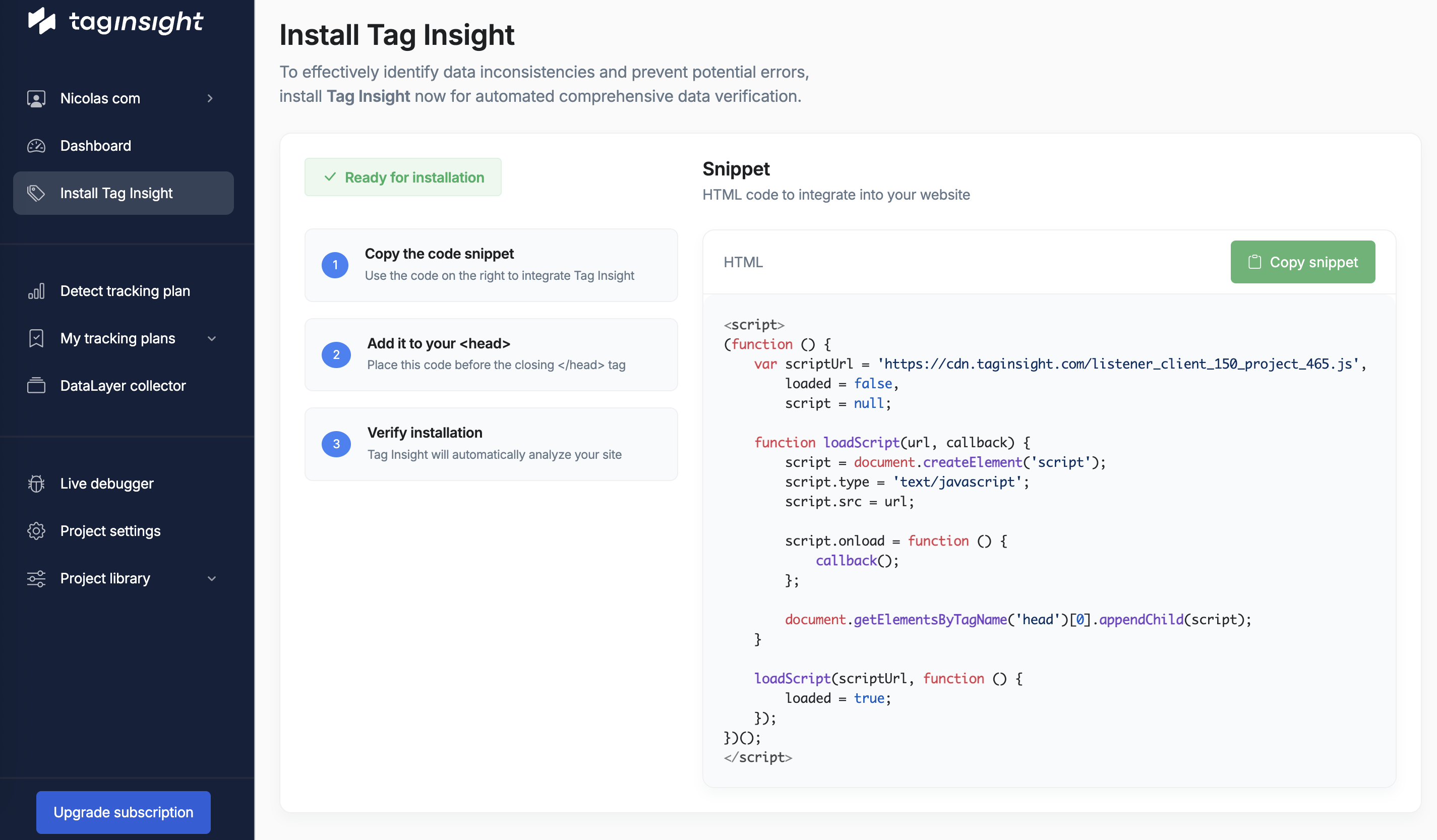
What you’ll need
Before starting, make sure you have:- Your Tag Insight Project ID (found in your dashboard under Project Settings)
- Access to your tag management system (Google Tag Manager, Commander Act, etc.)
- Someone from your technical team to help with the installation
Not sure about your tag management system? Ask your web developer or IT team - they’ll know!
Installation steps
For Google Tag Manager users
Share these instructions with your developer:1
Access Google Tag Manager
Ask your developer to log into your GTM account and open the correct container
2
Create Tag Insight tag
They’ll create a new tag called “Tag Insight - Monitoring” and add the Tag Insight code
3
Set it to run on all pages
The tag should trigger on every page of your website
4
Test and publish
Your developer will test it’s working correctly, then publish the changes
For Commander Act users
Share these instructions with your developer:1
Access Commander Act
Your developer needs to log into Commander Act and open your container
2
Add Tag Insight
They’ll add Tag Insight as a new tag in the system
3
Configure for all pages
The tag should be active on every page
4
Deploy
Your developer will deploy the updated container
For other websites
If you don’t use a tag management system, your developer will add the Tag Insight code directly to your website.Verifying installation
Once your developer has installed Tag Insight:1
Go to your Tag Insight dashboard
Log into Tag Insight and open your project
2
Check the Live Debugger
Navigate to Live Debugger in the menu
3
Visit your website
Open your website in a new tab and browse a few pages
4
Confirm data is flowing
You should see events appearing in the Live Debugger within a few seconds
If you don’t see any data after 5 minutes, contact our support team at [email protected]
Multiple environments
If you have different versions of your website (like staging and production), you’ll need:- A separate Tag Insight project for each environment
- Your developer to install the appropriate Project ID on each version
Common questions
Do I need technical knowledge to install Tag Insight?
Do I need technical knowledge to install Tag Insight?
No, but you’ll need help from your web developer or tag management team. Share this guide with them.
How long does installation take?
How long does installation take?
Typically 5-10 minutes for someone familiar with your tag management system.
Will it slow down my website?
Will it slow down my website?
No, Tag Insight is designed to have minimal impact on your website’s performance.
Can I install it on multiple websites?
Can I install it on multiple websites?
Yes, but you’ll need a separate project for each website or major section of your business.
Next steps
After installation is complete:Import your tracking plan
Upload your existing tracking documentation
Set up monitoring
Configure automatic checks for your tracking
Install Chrome extension
Get our browser extension for easy debugging
Configure alerts
Set up email notifications for tracking issues