> ## Documentation Index
> Fetch the complete documentation index at: https://docs.taginsight.com/llms.txt
> Use this file to discover all available pages before exploring further.
# Variable configuration
> Set up data quality rules to ensure your tracking stays accurate
## Overview
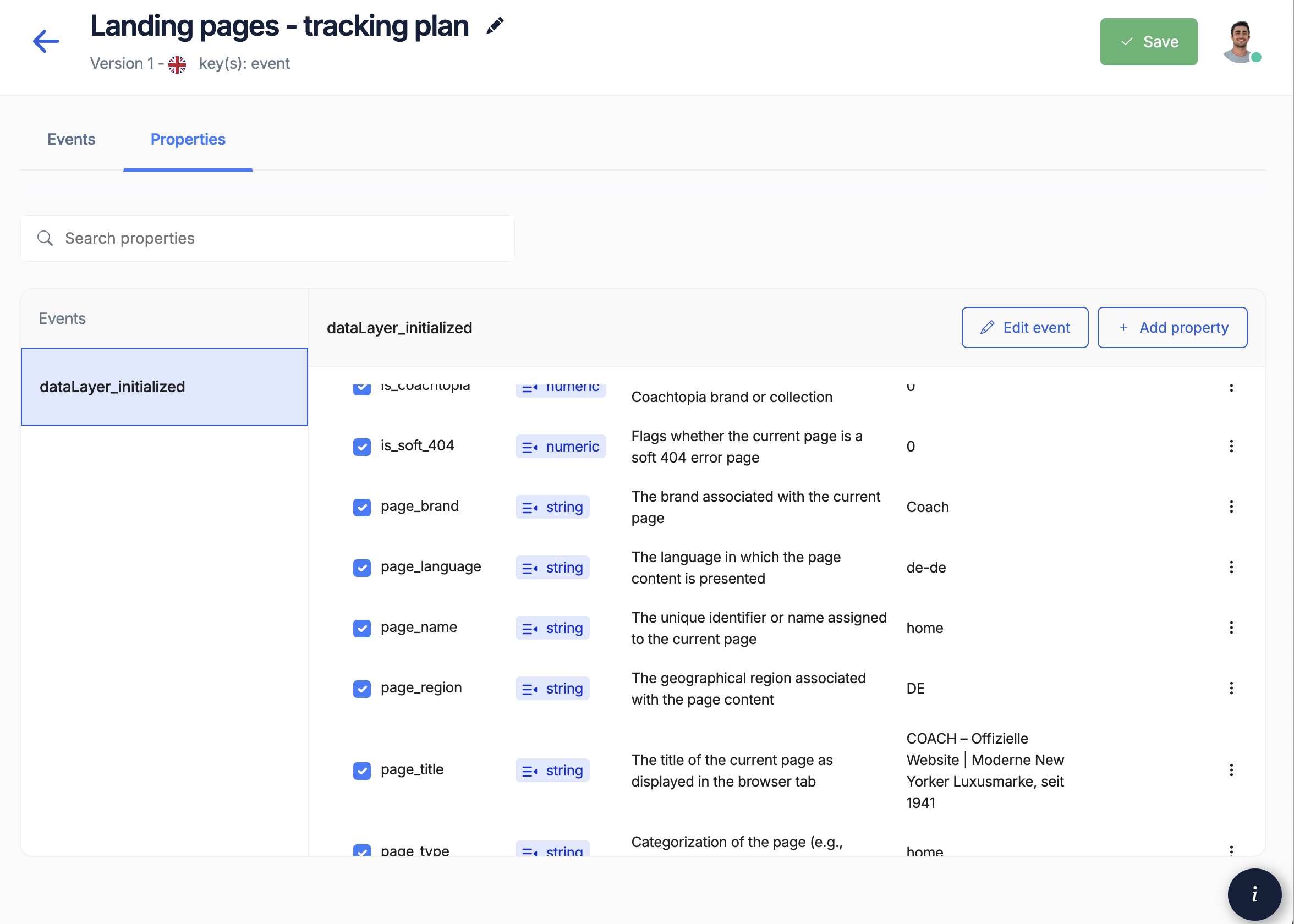
Variables are the specific pieces of information you collect with each tracking event. Think of them like form fields - each one needs rules about what kind of data it should contain. Tag Insight uses these rules to alert you when something's wrong.
 ## What are variables?
### Simple explanation
When someone views a product on your website, you might track:
* **Event**: "product\_viewed"
* **Variables**: The details about that product view
* Product ID (like SKU12345)
* Product name (Blue T-Shirt)
* Price (\$29.99)
* Category (Clothing)
Each of these details is a variable that needs configuration.
### Why configure variables?
Without rules, your tracking can collect messy data:
* Prices might come through as text instead of numbers
* Product IDs might be missing or wrong format
* Currencies might be inconsistent
Configuration prevents these issues by setting clear expectations.
## Setting up variable rules
## What are variables?
### Simple explanation
When someone views a product on your website, you might track:
* **Event**: "product\_viewed"
* **Variables**: The details about that product view
* Product ID (like SKU12345)
* Product name (Blue T-Shirt)
* Price (\$29.99)
* Category (Clothing)
Each of these details is a variable that needs configuration.
### Why configure variables?
Without rules, your tracking can collect messy data:
* Prices might come through as text instead of numbers
* Product IDs might be missing or wrong format
* Currencies might be inconsistent
Configuration prevents these issues by setting clear expectations.
## Setting up variable rules
 ### Basic variable properties
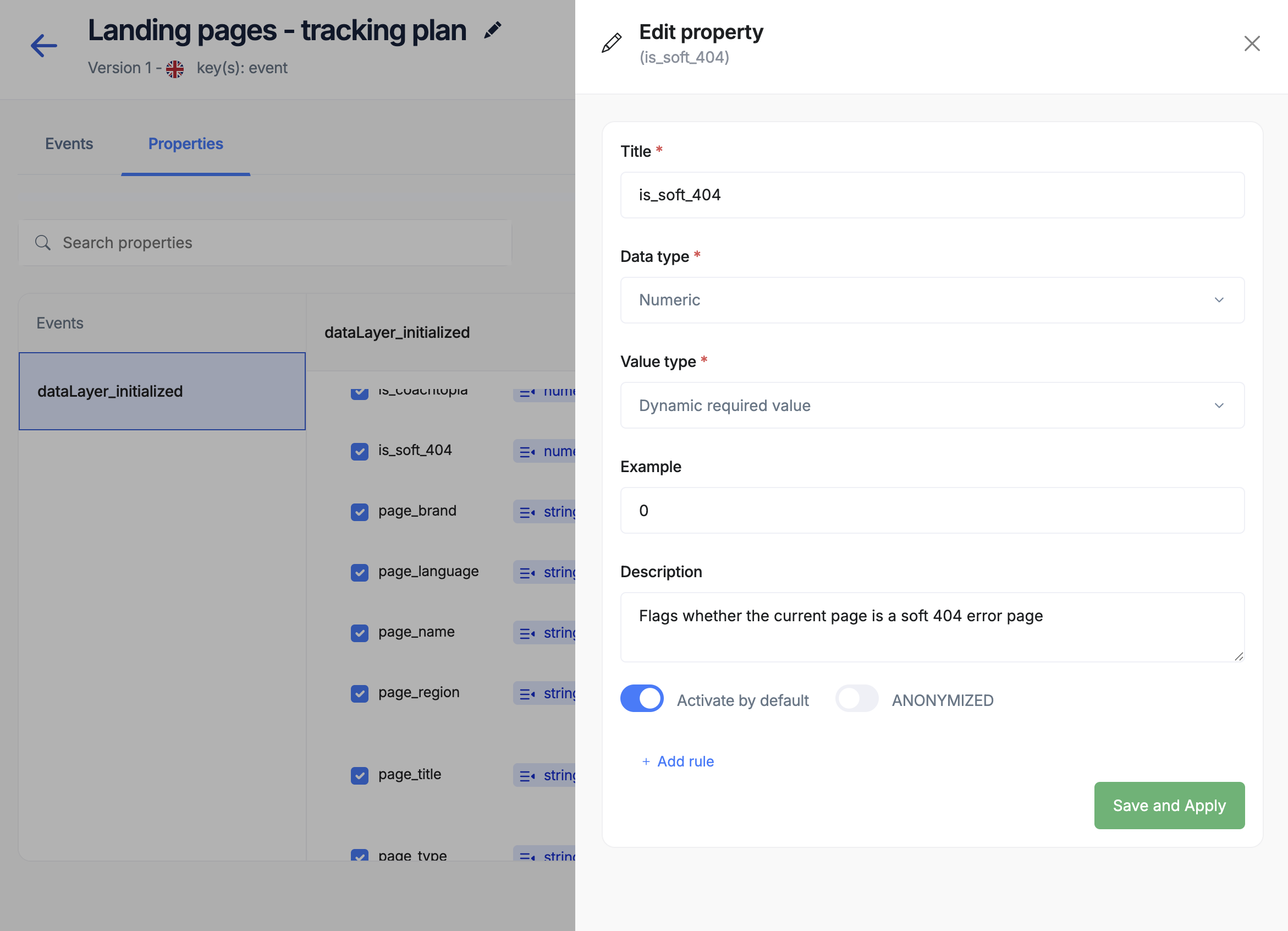
For each piece of data you collect, define:
**Identification**
* Name: How developers reference it (product\_id)
* Display name: How you see it (Product ID)
* Description: What it means (Unique product code)
**Data types**
* Text: Names, IDs, descriptions
* Numbers: Prices, quantities, percentages
* Yes/No: Is logged in, has discount
* Lists: Multiple products, categories
**Rules**
* Required: Must always be present
* Optional: Nice to have but not critical
* Conditional: Required only in certain cases
## Common variable types
### E-commerce variables
* Product ID/SKU
* Product name
* Price
* Category
* Brand
* Availability
* Order ID
* Total amount
* Currency
* Payment method
* Shipping cost
* Tax amount
* Customer ID
* Customer type
* Login status
* Location
* Preferences
* Page views
* Search terms
* Click locations
* Time on page
* Scroll depth
### Setting rules for each type
**Examples**: Product names, IDs, categories
**Common rules**:
* Maximum length (e.g., 255 characters)
* Required format (e.g., SKU must start with "PRD-")
* Can't be empty
* Case sensitivity
**Examples**: Prices, quantities, percentages
**Common rules**:
* Must be positive
* Maximum value (e.g., price under \$10,000)
* Decimal places (e.g., 2 for currency)
* Whole numbers only (for quantities)
**Examples**: Is logged in, has premium, accepted terms
**Common rules**:
* Must be true or false
* Default value if missing
* What counts as "yes" (true, 1, yes)
**Examples**: Product categories, selected options
**Common rules**:
* Minimum items (at least 1)
* Maximum items (no more than 10)
* No duplicates
* Valid values only
## Real-world examples
### Product tracking
For tracking product information:
**Product ID**
* Type: Text
* Required: Yes
* Format: Must match your SKU pattern
* Example: "SKU-12345" or "PROD-BLUE-SHIRT-M"
**Price**
* Type: Number
* Required: Yes
* Rules: Must be positive, maximum 2 decimal places
* Example: 29.99 (not "\$29.99" or "29.99 USD")
**Category**
* Type: Text
* Required: Yes
* Allowed values: List of your categories
* Example: "Clothing", "Electronics", "Home"
### Customer tracking
For tracking customer data:
**Customer ID**
* Type: Text
* Required: When logged in
* Privacy: May need to be anonymized
* Example: "CUST-12345" or hashed value
**Customer type**
* Type: Text
* Required: No
* Allowed values: "guest", "member", "premium", "business"
* Default: "guest"
## Privacy considerations
### Basic variable properties
For each piece of data you collect, define:
**Identification**
* Name: How developers reference it (product\_id)
* Display name: How you see it (Product ID)
* Description: What it means (Unique product code)
**Data types**
* Text: Names, IDs, descriptions
* Numbers: Prices, quantities, percentages
* Yes/No: Is logged in, has discount
* Lists: Multiple products, categories
**Rules**
* Required: Must always be present
* Optional: Nice to have but not critical
* Conditional: Required only in certain cases
## Common variable types
### E-commerce variables
* Product ID/SKU
* Product name
* Price
* Category
* Brand
* Availability
* Order ID
* Total amount
* Currency
* Payment method
* Shipping cost
* Tax amount
* Customer ID
* Customer type
* Login status
* Location
* Preferences
* Page views
* Search terms
* Click locations
* Time on page
* Scroll depth
### Setting rules for each type
**Examples**: Product names, IDs, categories
**Common rules**:
* Maximum length (e.g., 255 characters)
* Required format (e.g., SKU must start with "PRD-")
* Can't be empty
* Case sensitivity
**Examples**: Prices, quantities, percentages
**Common rules**:
* Must be positive
* Maximum value (e.g., price under \$10,000)
* Decimal places (e.g., 2 for currency)
* Whole numbers only (for quantities)
**Examples**: Is logged in, has premium, accepted terms
**Common rules**:
* Must be true or false
* Default value if missing
* What counts as "yes" (true, 1, yes)
**Examples**: Product categories, selected options
**Common rules**:
* Minimum items (at least 1)
* Maximum items (no more than 10)
* No duplicates
* Valid values only
## Real-world examples
### Product tracking
For tracking product information:
**Product ID**
* Type: Text
* Required: Yes
* Format: Must match your SKU pattern
* Example: "SKU-12345" or "PROD-BLUE-SHIRT-M"
**Price**
* Type: Number
* Required: Yes
* Rules: Must be positive, maximum 2 decimal places
* Example: 29.99 (not "\$29.99" or "29.99 USD")
**Category**
* Type: Text
* Required: Yes
* Allowed values: List of your categories
* Example: "Clothing", "Electronics", "Home"
### Customer tracking
For tracking customer data:
**Customer ID**
* Type: Text
* Required: When logged in
* Privacy: May need to be anonymized
* Example: "CUST-12345" or hashed value
**Customer type**
* Type: Text
* Required: No
* Allowed values: "guest", "member", "premium", "business"
* Default: "guest"
## Privacy considerations
 ### Protecting customer data
Some variables contain sensitive information:
Always work with your legal team to ensure privacy compliance
**Email addresses**
* Consider anonymizing (showing only domain)
* Or hash for privacy
* Never expose in reports
**Personal information**
* Phone numbers
* Full names
* Addresses
* Payment details
**Location data**
* IP addresses (truncate last part)
* Precise coordinates
* Home addresses
### Anonymization options
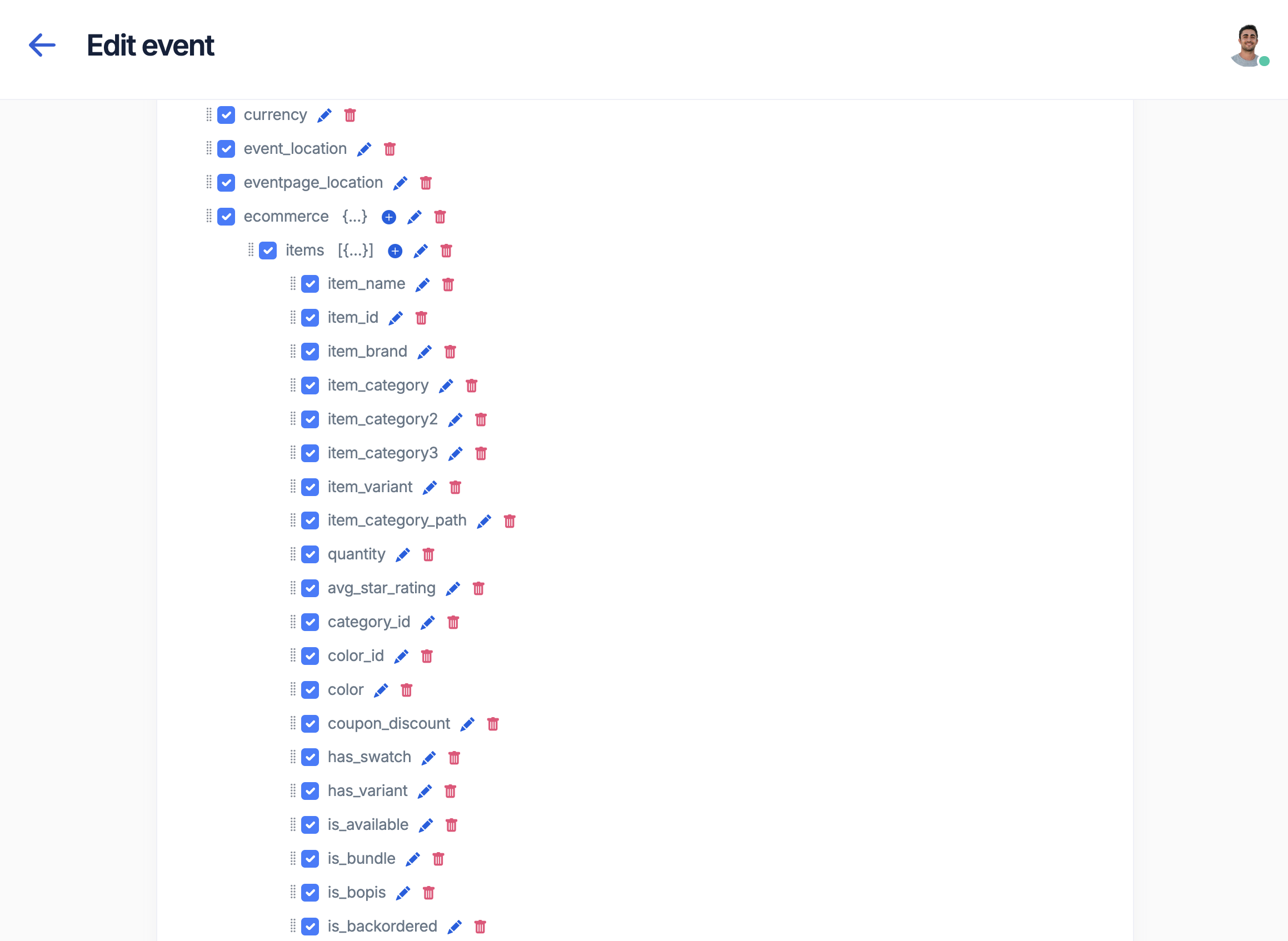
Tag Insight can automatically protect sensitive data:
* **Hashing**: Converts data to anonymous ID
* **Masking**: Hides part (e.g., john\*\*\*\*@email.com)
* **Removal**: Doesn't collect at all
* **Truncation**: Keeps only part (e.g., city not address)
## Variable organization
### Group related variables
Organize variables into logical categories:
**Product data**
* All product-related fields together
* Consistent naming (product\_id, product\_name, product\_price)
* Same rules across events
**User data**
* User identification
* Preferences
* Status information
* Behavior metrics
**Transaction data**
* Order information
* Payment details
* Shipping data
* Financial metrics
### Create templates
Save time by creating standard variable sets:
**Basic product template**
* Product ID (required)
* Product name (required)
* Price (required)
* Category (required)
**Extended product template**
* Everything from basic
* Brand (optional)
* Color (optional)
* Size (optional)
* Reviews (optional)
## Common issues and solutions
### Issue: Wrong data types
**Problem**: Price coming through as "\$29.99" (text) instead of 29.99 (number)
**Solution**:
* Set clear rules that price must be a number
* Work with developers to fix the source
* Tag Insight will alert when this happens
### Issue: Missing required data
**Problem**: Orders without order IDs
**Solution**:
* Mark order\_id as required
* Get alerts when it's missing
* Fix before it affects reporting
### Issue: Inconsistent formats
**Problem**: Dates in different formats (01/15/2024 vs 2024-01-15)
**Solution**:
* Define one standard format
* Document it clearly
* Monitor for violations
## Best practices
Don't over-complicate initial rules
Explain what each variable means
Verify rules work with real data
Update as business needs change
### Do's and don'ts
**Do:**
* ✅ Use descriptive names
* ✅ Set reasonable limits
* ✅ Consider edge cases
* ✅ Plan for growth
* ✅ Protect privacy
**Don't:**
* ❌ Make rules too strict
* ❌ Forget documentation
* ❌ Ignore privacy laws
* ❌ Skip testing
* ❌ Assume one size fits all
## Working with your team
### Marketing's role
* Define what data you need
* Explain business context
* Review variable names
* Approve privacy approach
### Developer's role
* Implement correct data types
* Follow naming conventions
* Handle edge cases
* Fix validation errors
### Working together
* Regular reviews of variable health
* Quick fixes when issues arise
* Documentation updates
* Privacy compliance checks
## Getting started checklist
Before configuring variables:
* [ ] List all data points you need
* [ ] Define the purpose of each
* [ ] Determine required vs optional
* [ ] Consider privacy implications
* [ ] Document expected formats
* [ ] Plan validation rules
* [ ] Review with team
## Next steps
Build standard event templates
Bring in current configuration
Configure quality alerts
Variable naming guide
### Protecting customer data
Some variables contain sensitive information:
Always work with your legal team to ensure privacy compliance
**Email addresses**
* Consider anonymizing (showing only domain)
* Or hash for privacy
* Never expose in reports
**Personal information**
* Phone numbers
* Full names
* Addresses
* Payment details
**Location data**
* IP addresses (truncate last part)
* Precise coordinates
* Home addresses
### Anonymization options
Tag Insight can automatically protect sensitive data:
* **Hashing**: Converts data to anonymous ID
* **Masking**: Hides part (e.g., john\*\*\*\*@email.com)
* **Removal**: Doesn't collect at all
* **Truncation**: Keeps only part (e.g., city not address)
## Variable organization
### Group related variables
Organize variables into logical categories:
**Product data**
* All product-related fields together
* Consistent naming (product\_id, product\_name, product\_price)
* Same rules across events
**User data**
* User identification
* Preferences
* Status information
* Behavior metrics
**Transaction data**
* Order information
* Payment details
* Shipping data
* Financial metrics
### Create templates
Save time by creating standard variable sets:
**Basic product template**
* Product ID (required)
* Product name (required)
* Price (required)
* Category (required)
**Extended product template**
* Everything from basic
* Brand (optional)
* Color (optional)
* Size (optional)
* Reviews (optional)
## Common issues and solutions
### Issue: Wrong data types
**Problem**: Price coming through as "\$29.99" (text) instead of 29.99 (number)
**Solution**:
* Set clear rules that price must be a number
* Work with developers to fix the source
* Tag Insight will alert when this happens
### Issue: Missing required data
**Problem**: Orders without order IDs
**Solution**:
* Mark order\_id as required
* Get alerts when it's missing
* Fix before it affects reporting
### Issue: Inconsistent formats
**Problem**: Dates in different formats (01/15/2024 vs 2024-01-15)
**Solution**:
* Define one standard format
* Document it clearly
* Monitor for violations
## Best practices
Don't over-complicate initial rules
Explain what each variable means
Verify rules work with real data
Update as business needs change
### Do's and don'ts
**Do:**
* ✅ Use descriptive names
* ✅ Set reasonable limits
* ✅ Consider edge cases
* ✅ Plan for growth
* ✅ Protect privacy
**Don't:**
* ❌ Make rules too strict
* ❌ Forget documentation
* ❌ Ignore privacy laws
* ❌ Skip testing
* ❌ Assume one size fits all
## Working with your team
### Marketing's role
* Define what data you need
* Explain business context
* Review variable names
* Approve privacy approach
### Developer's role
* Implement correct data types
* Follow naming conventions
* Handle edge cases
* Fix validation errors
### Working together
* Regular reviews of variable health
* Quick fixes when issues arise
* Documentation updates
* Privacy compliance checks
## Getting started checklist
Before configuring variables:
* [ ] List all data points you need
* [ ] Define the purpose of each
* [ ] Determine required vs optional
* [ ] Consider privacy implications
* [ ] Document expected formats
* [ ] Plan validation rules
* [ ] Review with team
## Next steps
Build standard event templates
Bring in current configuration
Configure quality alerts
Variable naming guide