> ## Documentation Index
> Fetch the complete documentation index at: https://docs.taginsight.com/llms.txt
> Use this file to discover all available pages before exploring further.
# Export documentation
> Generate and share tracking plan documentation in various formats
## Overview
Tag Insight allows you to export your tracking plans, making it easy to share documentation with stakeholders, maintain version control, and integrate with other tools.
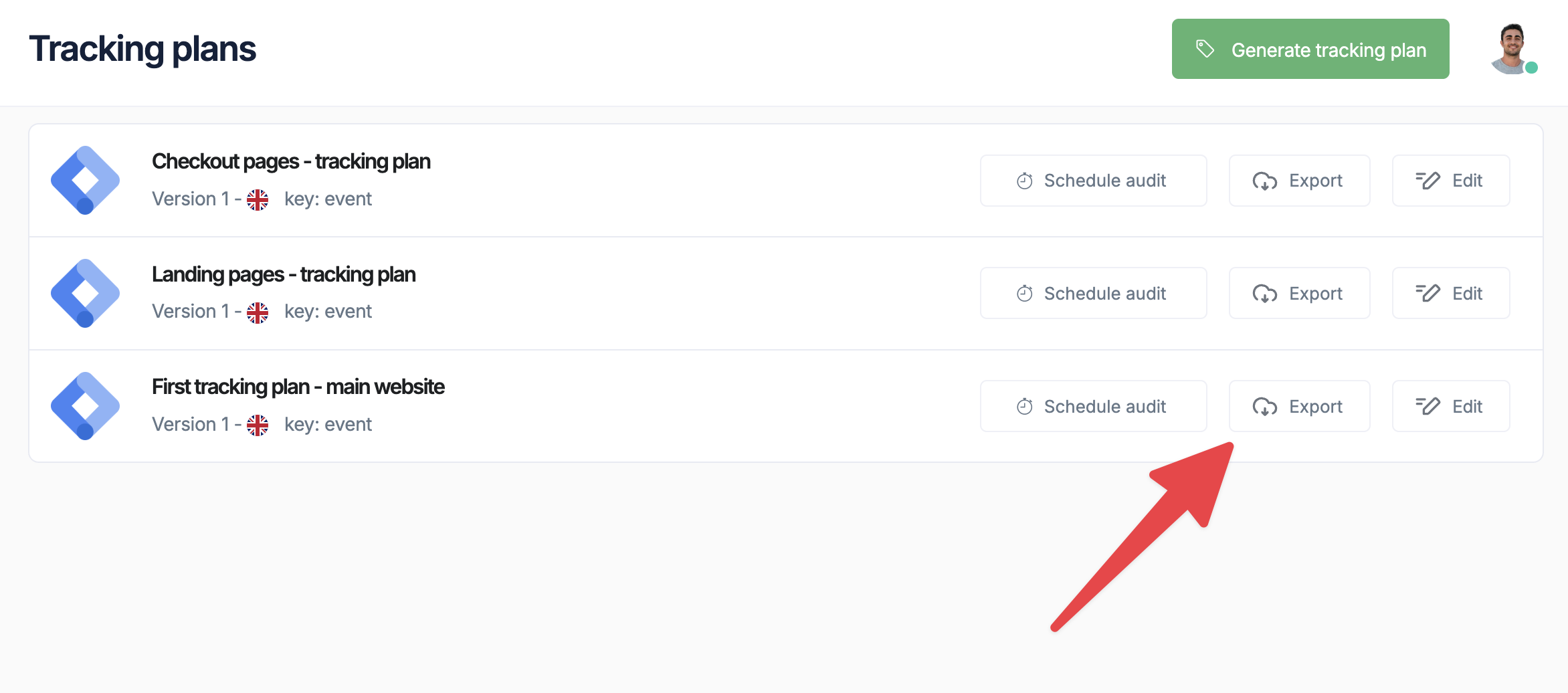 Export functionality helps maintain a single source of truth for your tracking implementation across technical and business teams.
## Available export formats
### Supported format
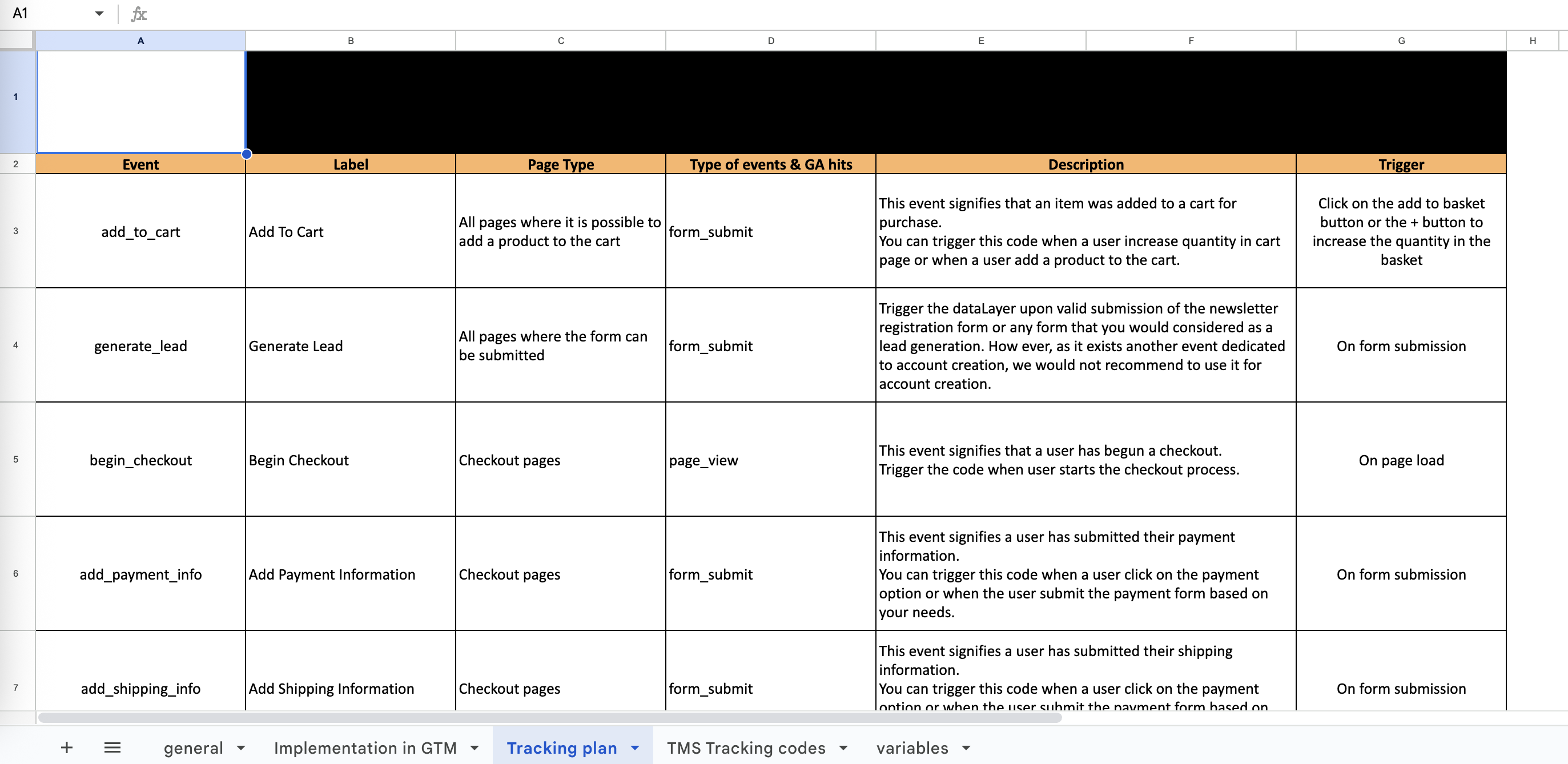
Comprehensive spreadsheet with all events, variables, and validation rules in a structured format that's easy to share and review with stakeholders
Tag Insight currently exports tracking plans in Excel format, which provides the most flexibility for sharing and editing documentation across teams.
## Exporting tracking plans
Export functionality helps maintain a single source of truth for your tracking implementation across technical and business teams.
## Available export formats
### Supported format
Comprehensive spreadsheet with all events, variables, and validation rules in a structured format that's easy to share and review with stakeholders
Tag Insight currently exports tracking plans in Excel format, which provides the most flexibility for sharing and editing documentation across teams.
## Exporting tracking plans
 ### Quick export
Go to **My tracking plans** and select the plan to export
Find the export icon in the top toolbar
Select your desired export format
Set export preferences (see options below)
Click **Export** to generate and download
### Export options
Configure what to include in your export:
```javascript theme={null}
{
// Content Options
includeEvents: true,
includeVariables: true,
includeValidationRules: true,
includeExamples: true,
includeChangeHistory: false,
// Filtering
eventFilter: "all", // all, active, deprecated
dateRange: "current", // current, last30days, all
// Formatting
groupByCategory: true,
includeDescriptions: true,
technicalDetails: "full" // full, simplified, none
}
```
## Excel export details
### Worksheet structure
The Excel export contains multiple worksheets:
**Overview worksheet includes:**
* Tracking plan metadata
* Statistics (total events, variables)
* Last modified date
* Implementation status
**Complete event listing:**
* Event name and description
* Category and subcategory
* Trigger conditions
* Business purpose
* Status (active/deprecated)
**All variables with:**
* Variable name and type
* Required/optional status
* Validation rules
* Example values
* Used in events
**Validation rules:**
* Pattern matching rules
* Value constraints
* Type requirements
* Custom validations
### Excel template example
```
| Event Name | Description | Category | Variables | Status |
|------------|-------------|----------|-----------|---------|
| product_viewed | User views product page | E-commerce | product_id (required), price (required), category (optional) | Active |
| add_to_cart | Product added to cart | E-commerce | product_id (required), quantity (required), cart_value (required) | Active |
```
## PDF documentation
### Professional reports
Generate formatted PDF documentation for:
* **Stakeholder Reviews**: Clean, readable format
* **Compliance Documentation**: Include validation rules
* **Implementation Guides**: Technical specifications
* **Change Management**: Version history included
### PDF options
Choose from:
* Technical Documentation
* Business Overview
* Implementation Guide
* Audit Report
Add your company logo and colors
* Executive Summary
* Standard Documentation
* Complete Technical Specs
Processing typically takes 10-30 seconds
## Automated exports
### Scheduled exports
Set up automatic documentation updates:
```javascript theme={null}
// Export configuration (in Project Settings)
{
"scheduled_exports": {
"enabled": true,
"frequency": "weekly", // daily, weekly, monthly
"day": "monday",
"time": "09:00",
"format": "excel",
"recipients": [
"analytics-team@company.com",
"product-team@company.com"
],
"include_changes_only": false
}
}
```
### Email notifications
Get notified when scheduled exports are ready:
* Export completion notifications
* Download links sent via email
* Expiration reminders
## Import/export workflow
### Maintaining consistency
Export from production project
Make changes in Excel or JSON
Use Tag Insight's validation before import
Upload modified plan back to Tag Insight
Verify changes work correctly
### Version control best practices
```bash theme={null}
# Example Git workflow
tracking-plans/
├── production/
│ ├── ecommerce-plan-v2.1.json
│ ├── ecommerce-plan-v2.0.json
│ └── changelog.md
├── staging/
│ └── ecommerce-plan-staging.json
└── templates/
└── standard-events.json
```
## Sharing documentation
### Access control
Control who can export documentation:
* **Read-Only Users**: Can export current version
* **Editors**: Can export with full history
* **Admins**: Can export all formats and configure automation
### Secure sharing
Exported documentation may contain sensitive information about your tracking implementation. Use secure channels for sharing.
Best practices for sharing:
* Use company-approved file sharing
* Set expiration dates on shared links
* Password-protect sensitive exports
* Track who receives documentation
## Integration examples
### Confluence integration
Upload exported documentation directly to Confluence pages for team collaboration.
### Jira integration
Link tracking requirements to development tickets:
```
As a developer, I need to implement the following events:
[Attached: tracking-plan-checkout-flow.xlsx]
Events to implement:
- checkout_started
- payment_method_selected
- purchase_completed
```
### Slack notifications
```javascript theme={null}
// Notify team of documentation updates
{
"text": "Tracking Plan Updated",
"attachments": [{
"title": "E-commerce Tracking Plan v2.2",
"text": "3 new events added, 2 variables updated",
"actions": [{
"text": "Download Excel",
"url": "https://taginsight.com/export/xlsx/plan123"
}]
}]
}
```
## Export templates
### Custom templates
Create reusable export templates:
```javascript theme={null}
// Save as template
{
"template_name": "Weekly Analytics Report",
"format": "excel",
"options": {
"include_events": true,
"include_validation": true,
"include_examples": false,
"group_by": "category",
"filter": {
"status": ["active"],
"categories": ["e-commerce", "user-actions"]
}
}
}
```
### Industry templates
Pre-built templates for common use cases:
Export format matching GA4 structure
Focus on PII and consent tracking
Technical implementation details
Testing scenarios and validation
## Troubleshooting exports
* Large plans may take 1-2 minutes
* Consider filtering to reduce size
* Use JSON for faster exports
* Check export options selected
* Verify user permissions
* Some fields may be hidden based on role
* PDF requires Pro plan or higher
* API access needs Enterprise plan
* Check your subscription level
## Next steps
Import tracking plans back
Automate exports via API
Manage tracking plan versions
Share documentation effectively
### Quick export
Go to **My tracking plans** and select the plan to export
Find the export icon in the top toolbar
Select your desired export format
Set export preferences (see options below)
Click **Export** to generate and download
### Export options
Configure what to include in your export:
```javascript theme={null}
{
// Content Options
includeEvents: true,
includeVariables: true,
includeValidationRules: true,
includeExamples: true,
includeChangeHistory: false,
// Filtering
eventFilter: "all", // all, active, deprecated
dateRange: "current", // current, last30days, all
// Formatting
groupByCategory: true,
includeDescriptions: true,
technicalDetails: "full" // full, simplified, none
}
```
## Excel export details
### Worksheet structure
The Excel export contains multiple worksheets:
**Overview worksheet includes:**
* Tracking plan metadata
* Statistics (total events, variables)
* Last modified date
* Implementation status
**Complete event listing:**
* Event name and description
* Category and subcategory
* Trigger conditions
* Business purpose
* Status (active/deprecated)
**All variables with:**
* Variable name and type
* Required/optional status
* Validation rules
* Example values
* Used in events
**Validation rules:**
* Pattern matching rules
* Value constraints
* Type requirements
* Custom validations
### Excel template example
```
| Event Name | Description | Category | Variables | Status |
|------------|-------------|----------|-----------|---------|
| product_viewed | User views product page | E-commerce | product_id (required), price (required), category (optional) | Active |
| add_to_cart | Product added to cart | E-commerce | product_id (required), quantity (required), cart_value (required) | Active |
```
## PDF documentation
### Professional reports
Generate formatted PDF documentation for:
* **Stakeholder Reviews**: Clean, readable format
* **Compliance Documentation**: Include validation rules
* **Implementation Guides**: Technical specifications
* **Change Management**: Version history included
### PDF options
Choose from:
* Technical Documentation
* Business Overview
* Implementation Guide
* Audit Report
Add your company logo and colors
* Executive Summary
* Standard Documentation
* Complete Technical Specs
Processing typically takes 10-30 seconds
## Automated exports
### Scheduled exports
Set up automatic documentation updates:
```javascript theme={null}
// Export configuration (in Project Settings)
{
"scheduled_exports": {
"enabled": true,
"frequency": "weekly", // daily, weekly, monthly
"day": "monday",
"time": "09:00",
"format": "excel",
"recipients": [
"analytics-team@company.com",
"product-team@company.com"
],
"include_changes_only": false
}
}
```
### Email notifications
Get notified when scheduled exports are ready:
* Export completion notifications
* Download links sent via email
* Expiration reminders
## Import/export workflow
### Maintaining consistency
Export from production project
Make changes in Excel or JSON
Use Tag Insight's validation before import
Upload modified plan back to Tag Insight
Verify changes work correctly
### Version control best practices
```bash theme={null}
# Example Git workflow
tracking-plans/
├── production/
│ ├── ecommerce-plan-v2.1.json
│ ├── ecommerce-plan-v2.0.json
│ └── changelog.md
├── staging/
│ └── ecommerce-plan-staging.json
└── templates/
└── standard-events.json
```
## Sharing documentation
### Access control
Control who can export documentation:
* **Read-Only Users**: Can export current version
* **Editors**: Can export with full history
* **Admins**: Can export all formats and configure automation
### Secure sharing
Exported documentation may contain sensitive information about your tracking implementation. Use secure channels for sharing.
Best practices for sharing:
* Use company-approved file sharing
* Set expiration dates on shared links
* Password-protect sensitive exports
* Track who receives documentation
## Integration examples
### Confluence integration
Upload exported documentation directly to Confluence pages for team collaboration.
### Jira integration
Link tracking requirements to development tickets:
```
As a developer, I need to implement the following events:
[Attached: tracking-plan-checkout-flow.xlsx]
Events to implement:
- checkout_started
- payment_method_selected
- purchase_completed
```
### Slack notifications
```javascript theme={null}
// Notify team of documentation updates
{
"text": "Tracking Plan Updated",
"attachments": [{
"title": "E-commerce Tracking Plan v2.2",
"text": "3 new events added, 2 variables updated",
"actions": [{
"text": "Download Excel",
"url": "https://taginsight.com/export/xlsx/plan123"
}]
}]
}
```
## Export templates
### Custom templates
Create reusable export templates:
```javascript theme={null}
// Save as template
{
"template_name": "Weekly Analytics Report",
"format": "excel",
"options": {
"include_events": true,
"include_validation": true,
"include_examples": false,
"group_by": "category",
"filter": {
"status": ["active"],
"categories": ["e-commerce", "user-actions"]
}
}
}
```
### Industry templates
Pre-built templates for common use cases:
Export format matching GA4 structure
Focus on PII and consent tracking
Technical implementation details
Testing scenarios and validation
## Troubleshooting exports
* Large plans may take 1-2 minutes
* Consider filtering to reduce size
* Use JSON for faster exports
* Check export options selected
* Verify user permissions
* Some fields may be hidden based on role
* PDF requires Pro plan or higher
* API access needs Enterprise plan
* Check your subscription level
## Next steps
Import tracking plans back
Automate exports via API
Manage tracking plan versions
Share documentation effectively