> ## Documentation Index
> Fetch the complete documentation index at: https://docs.taginsight.com/llms.txt
> Use this file to discover all available pages before exploring further.
# Event library
> Create and share standard tracking templates across your organization
## Overview
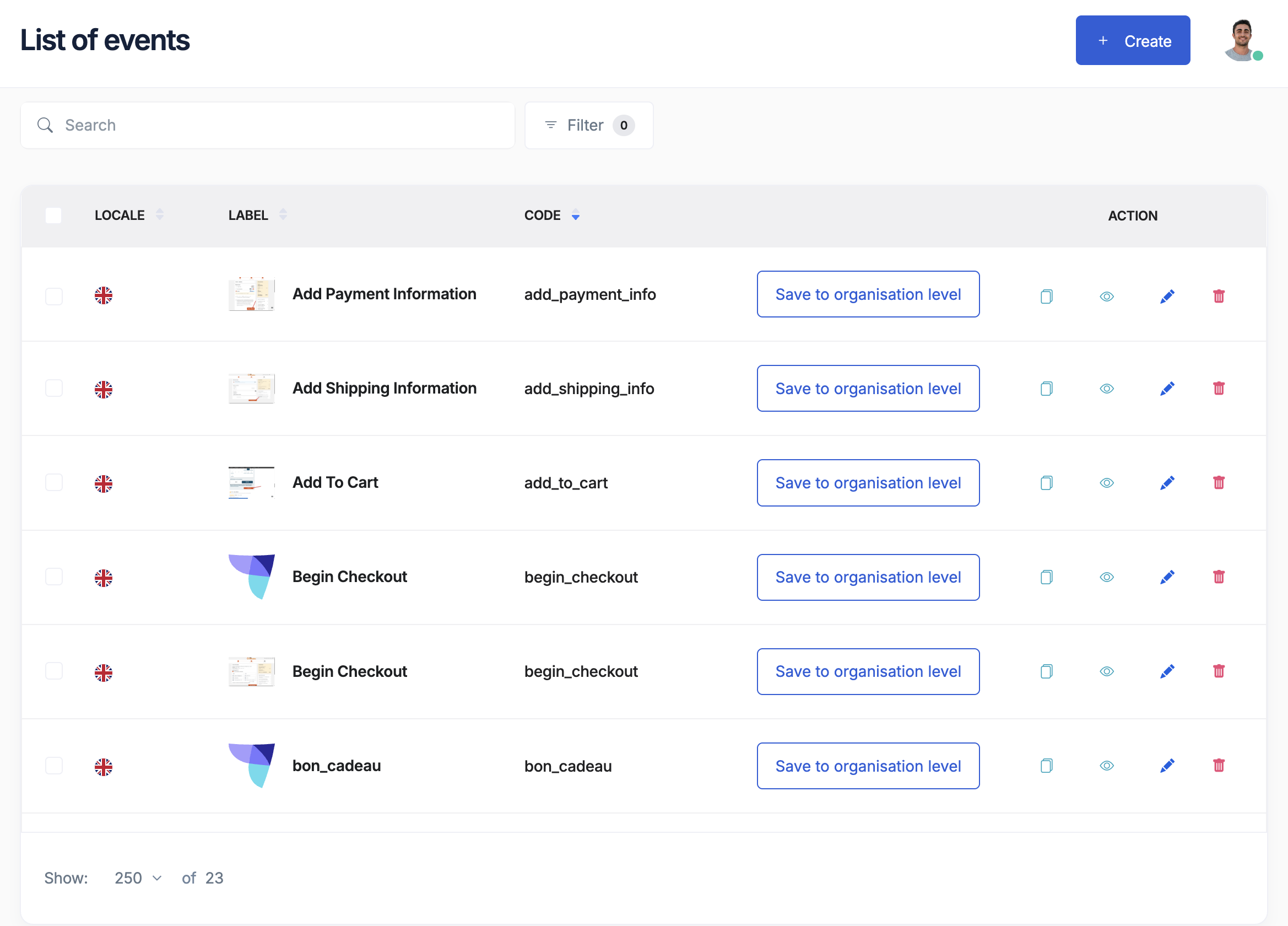
The Event Library is like a recipe book for your tracking. Instead of creating the same tracking events over and over, you can save them as templates and reuse them across all your websites and projects.
Think of the Event Library as your company's tracking standards - ensuring everyone tracks things the same way.
## Why use an event library?
 ### The problem it solves
Without a library:
* Each team tracks differently
* Same events have different names
* Data doesn't match across sites
* Updates are time-consuming
* Quality varies widely
With a library:
* Everyone uses the same templates
* Consistent naming everywhere
* Data matches perfectly
* Update once, apply everywhere
* Proven quality standards
## How the library works
### Two levels of libraries
**Shared across everything**
* Standards for the whole company
* Core events everyone uses
* Approved by leadership
* Managed centrally
Example: All brands use the same "purchase" event template
**Just for one project**
* Specific to that website
* Custom events for unique needs
* Quick experiments
* Local variations
Example: Special events just for your mobile app
## Creating library templates
### What's in a template?
Each event template includes:
1. **Basic information**
* Event name (like "product\_viewed")
* Friendly name (like "Product Page View")
* Description of when it fires
* Category (E-commerce, User, Content, etc.)
2. **Required data**
* What information must be collected
* Rules for each piece of data
* Examples of correct values
3. **Documentation**
* When to use this event
* Implementation notes
* Sample data
* Common mistakes to avoid
### Building your first template
Start with something critical like purchases or signups
* Name it clearly (product\_viewed)
* Describe when it happens
* Pick a category
What data is essential?
* Product ID
* Product name
* Price
* Category
* Examples of good data
* Common errors to avoid
* Business purpose
Choose company-wide or project-specific
## Common library templates
### E-commerce templates
* Product viewed
* Added to cart
* Checkout started
* Purchase completed
* Product reviewed
* Search performed
* Category viewed
* Filter applied
* Sort changed
* Results clicked
### Content templates
* Article read
* Video watched
* Content shared
* Comment posted
* Rating given
* Page viewed
* Menu clicked
* Tab switched
* Section scrolled
* Link followed
### User templates
* User registered
* Login completed
* Profile updated
* Password changed
* Account deleted
* Settings changed
* Notifications updated
* Language selected
* Theme switched
* Consent given
## Using library templates
### In your tracking plan
See what templates are available
Choose the ones you need
Add them with one click
Adjust for your specific needs
### Benefits of using templates
**Saves time**
* No need to reinvent the wheel
* Proven templates ready to use
* Faster implementation
**Improves quality**
* Best practices built in
* Common errors avoided
* Consistent data structure
**Easier maintenance**
* Update template once
* Changes apply everywhere
* Version tracking included
## Managing your library
### Organization tips
**Group by purpose**
* E-commerce events together
* User events together
* Marketing events together
* Technical events together
**Name clearly**
* Use descriptive names
* Follow naming conventions
* Include version numbers
* Add helpful prefixes
**Document everything**
* Why this event exists
* When to use it
* What data it needs
* Example implementations
### Template lifecycle
Template created but not approved
Approved and ready for use
New version available
No longer recommended
## Best practices
### Do's
✅ **Start simple**
* Begin with core events
* Add complexity gradually
* Test thoroughly
* Get feedback
✅ **Be consistent**
* Use standard naming
* Follow the same structure
* Apply uniformly
* Document clearly
✅ **Think ahead**
* Plan for growth
* Consider variations
* Allow flexibility
* Version properly
### Don'ts
❌ **Avoid these mistakes**
* Creating too many templates
* Making them too complex
* Skipping documentation
* Not getting buy-in
* Ignoring feedback
## Working with your team
### Marketing's role
* Define business needs
* Review template names
* Approve event purposes
* Ensure completeness
### Developer's role
* Implement templates correctly
* Suggest technical improvements
* Report implementation issues
* Maintain consistency
### Analytics team's role
* Create initial templates
* Update based on needs
* Monitor usage
* Train others
## Industry templates
### Available starting points
Tag Insight provides pre-built templates for:
Standard e-commerce events based on industry best practices
Content engagement tracking for publishers
User behavior and feature usage tracking
Form submissions and conversion tracking
### Customizing templates
Start with industry templates, then:
1. Review what's included
2. Remove what you don't need
3. Add your specific events
4. Adjust naming to match your style
5. Test with real scenarios
## Common questions
Typically a shared responsibility:
* Analytics team creates templates
* Marketing reviews and approves
* Developers implement
* All teams provide feedback
Start with 10-20 core events. Most businesses need:
* 5-10 user events
* 5-10 commerce events
* 5-10 content events
* Some custom events
Yes, but carefully:
* Version your changes
* Communicate updates
* Test thoroughly
* Update gradually
No. Create templates for:
* Frequently used events
* Critical business events
* Cross-team events
Skip one-off or experimental events
## Getting started checklist
Before building your library:
* [ ] List your most important events
* [ ] Review current tracking
* [ ] Identify common patterns
* [ ] Get team alignment
* [ ] Plan governance process
* [ ] Start with 5-10 templates
* [ ] Test thoroughly
* [ ] Document everything
## Next steps
Use templates in your plan
Turn current tracking into templates
Set up data rules
Event design guide
### The problem it solves
Without a library:
* Each team tracks differently
* Same events have different names
* Data doesn't match across sites
* Updates are time-consuming
* Quality varies widely
With a library:
* Everyone uses the same templates
* Consistent naming everywhere
* Data matches perfectly
* Update once, apply everywhere
* Proven quality standards
## How the library works
### Two levels of libraries
**Shared across everything**
* Standards for the whole company
* Core events everyone uses
* Approved by leadership
* Managed centrally
Example: All brands use the same "purchase" event template
**Just for one project**
* Specific to that website
* Custom events for unique needs
* Quick experiments
* Local variations
Example: Special events just for your mobile app
## Creating library templates
### What's in a template?
Each event template includes:
1. **Basic information**
* Event name (like "product\_viewed")
* Friendly name (like "Product Page View")
* Description of when it fires
* Category (E-commerce, User, Content, etc.)
2. **Required data**
* What information must be collected
* Rules for each piece of data
* Examples of correct values
3. **Documentation**
* When to use this event
* Implementation notes
* Sample data
* Common mistakes to avoid
### Building your first template
Start with something critical like purchases or signups
* Name it clearly (product\_viewed)
* Describe when it happens
* Pick a category
What data is essential?
* Product ID
* Product name
* Price
* Category
* Examples of good data
* Common errors to avoid
* Business purpose
Choose company-wide or project-specific
## Common library templates
### E-commerce templates
* Product viewed
* Added to cart
* Checkout started
* Purchase completed
* Product reviewed
* Search performed
* Category viewed
* Filter applied
* Sort changed
* Results clicked
### Content templates
* Article read
* Video watched
* Content shared
* Comment posted
* Rating given
* Page viewed
* Menu clicked
* Tab switched
* Section scrolled
* Link followed
### User templates
* User registered
* Login completed
* Profile updated
* Password changed
* Account deleted
* Settings changed
* Notifications updated
* Language selected
* Theme switched
* Consent given
## Using library templates
### In your tracking plan
See what templates are available
Choose the ones you need
Add them with one click
Adjust for your specific needs
### Benefits of using templates
**Saves time**
* No need to reinvent the wheel
* Proven templates ready to use
* Faster implementation
**Improves quality**
* Best practices built in
* Common errors avoided
* Consistent data structure
**Easier maintenance**
* Update template once
* Changes apply everywhere
* Version tracking included
## Managing your library
### Organization tips
**Group by purpose**
* E-commerce events together
* User events together
* Marketing events together
* Technical events together
**Name clearly**
* Use descriptive names
* Follow naming conventions
* Include version numbers
* Add helpful prefixes
**Document everything**
* Why this event exists
* When to use it
* What data it needs
* Example implementations
### Template lifecycle
Template created but not approved
Approved and ready for use
New version available
No longer recommended
## Best practices
### Do's
✅ **Start simple**
* Begin with core events
* Add complexity gradually
* Test thoroughly
* Get feedback
✅ **Be consistent**
* Use standard naming
* Follow the same structure
* Apply uniformly
* Document clearly
✅ **Think ahead**
* Plan for growth
* Consider variations
* Allow flexibility
* Version properly
### Don'ts
❌ **Avoid these mistakes**
* Creating too many templates
* Making them too complex
* Skipping documentation
* Not getting buy-in
* Ignoring feedback
## Working with your team
### Marketing's role
* Define business needs
* Review template names
* Approve event purposes
* Ensure completeness
### Developer's role
* Implement templates correctly
* Suggest technical improvements
* Report implementation issues
* Maintain consistency
### Analytics team's role
* Create initial templates
* Update based on needs
* Monitor usage
* Train others
## Industry templates
### Available starting points
Tag Insight provides pre-built templates for:
Standard e-commerce events based on industry best practices
Content engagement tracking for publishers
User behavior and feature usage tracking
Form submissions and conversion tracking
### Customizing templates
Start with industry templates, then:
1. Review what's included
2. Remove what you don't need
3. Add your specific events
4. Adjust naming to match your style
5. Test with real scenarios
## Common questions
Typically a shared responsibility:
* Analytics team creates templates
* Marketing reviews and approves
* Developers implement
* All teams provide feedback
Start with 10-20 core events. Most businesses need:
* 5-10 user events
* 5-10 commerce events
* 5-10 content events
* Some custom events
Yes, but carefully:
* Version your changes
* Communicate updates
* Test thoroughly
* Update gradually
No. Create templates for:
* Frequently used events
* Critical business events
* Cross-team events
Skip one-off or experimental events
## Getting started checklist
Before building your library:
* [ ] List your most important events
* [ ] Review current tracking
* [ ] Identify common patterns
* [ ] Get team alignment
* [ ] Plan governance process
* [ ] Start with 5-10 templates
* [ ] Test thoroughly
* [ ] Document everything
## Next steps
Use templates in your plan
Turn current tracking into templates
Set up data rules
Event design guide