> ## Documentation Index
> Fetch the complete documentation index at: https://docs.taginsight.com/llms.txt
> Use this file to discover all available pages before exploring further.
# Understanding audit reports
> Learn how to read and act on your tracking health reports
## Overview
Audit reports are like health checkups for your website tracking. They tell you what's working, what's broken, and what needs attention. Think of them as your tracking quality report card.
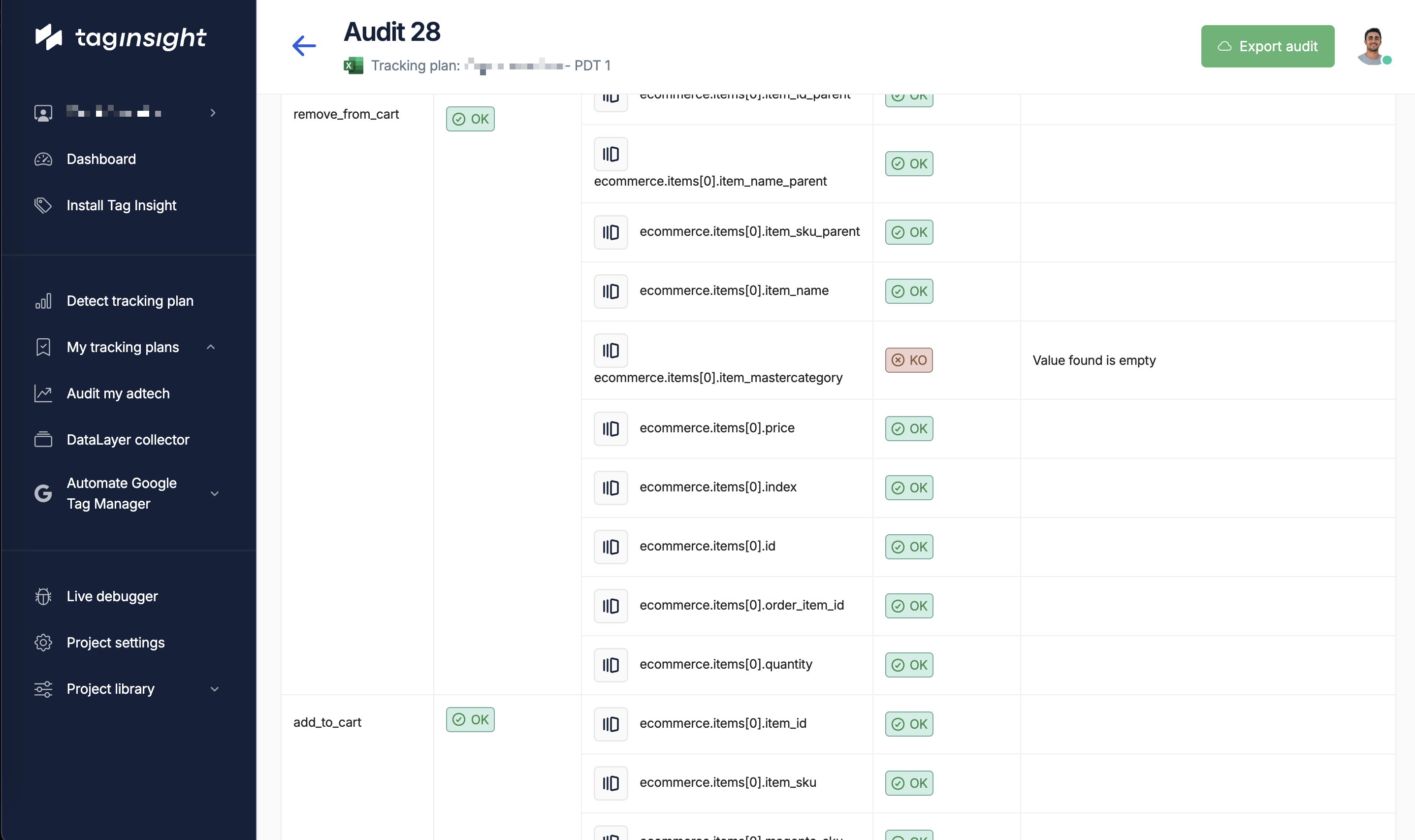 ## Reading your report
### The summary section
The summary gives you a quick snapshot - like checking your dashboard before a long drive.
At the top of every report, you'll see:
* **Overall health score**: A percentage showing how well your tracking is working
* **Issue counts**: How many problems were found
* **Time period**: When the audit ran
* **Events analyzed**: How much data was checked
Example:
```
Tracking Health: 94.2% ⚠️
Critical Issues: 3
Warnings: 12
Information: 8
Events Analyzed: 145,239
```
### Understanding issue severity
Issues are grouped by importance:
**Must fix immediately**
* Purchase tracking broken
* No data being collected
* Major data errors
Impact: Lost revenue data, wrong decisions
**Should fix soon**
* Missing optional data
* Format inconsistencies
* Performance issues
Impact: Incomplete reports, minor gaps
**Good to know**
* New events detected
* Successful checks
* Optimization tips
Impact: Opportunities to improve
## Common issues explained
### Missing events
**What it means**: Expected tracking isn't happening
**Example**:
"Purchase event missing on order confirmation page"
**Why it matters**:
* Can't measure conversions
* Revenue reports are wrong
* Marketing ROI unknown
**What to do**:
Tell your developer which pages aren't tracking properly
### Wrong data types
**What it means**: Information is in the wrong format
**Example**:
"Price sent as text (\$29.99) instead of number (29.99)"
**Why it matters**:
* Can't calculate totals
* Averages won't work
* Reports show errors
**What to do**:
Share the specific format issues with your tech team
### Missing information
**What it means**: Some details aren't being collected
**Example**:
"Order ID missing from 15% of purchases"
**Why it matters**:
* Can't track individual orders
* Duplicate counting possible
* Customer service impact
**What to do**:
Prioritize which missing data is most important
## Report sections
### 1. Issue list
A detailed list of every problem found:
* What's wrong
* Where it's happening
* How often it occurs
* When it started
### 2. Affected pages
Shows which parts of your site have issues:
* Homepage ✅ All good
* Product pages ⚠️ Minor issues
* Checkout ❌ Critical problems
### 3. Trend graphs
Visual charts showing:
* Is tracking getting better or worse?
* When did problems start?
* Are fixes working?
### 4. Data samples
Real examples of the problems:
* What you expected to see
* What actually happened
* The difference explained
## Understanding metrics
### Coverage score
How complete your tracking is:
**What**: Percentage of expected events working
* Excellent: 99-100%
* Good: 95-98%
* Needs work: Below 95%
**What**: Percentage of required information present
* Excellent: 100%
* Good: 98-99%
* Needs work: Below 98%
### Quality indicators
* **Accuracy**: Is the data correct?
* **Consistency**: Is it the same everywhere?
* **Timeliness**: Is it captured quickly?
* **Completeness**: Is anything missing?
## Taking action
### Priority guide
How to decide what to fix first:
| Issue Type | Business Impact | When to Fix |
| ------------------------ | ------------------- | -------------- |
| Purchase tracking broken | Revenue data lost | Immediately |
| Missing product details | Incomplete reports | This week |
| Format inconsistencies | Minor report issues | Next sprint |
| New events detected | No impact | Review monthly |
### Who does what
**Marketing team**:
* Review reports weekly
* Prioritize which issues matter most
* Communicate impact to stakeholders
* Track improvement over time
**Technical team**:
* Fix the identified issues
* Test changes before deploying
* Confirm fixes are working
* Prevent issues from returning
### Creating action items
For each issue:
1. Understand the business impact
2. Assign to right person
3. Set realistic deadline
4. Verify when complete
## Report features
### Filtering your view
Focus on what matters to you:
* Show only critical issues
* Filter by specific pages
* Look at certain events
* View recent problems only
### Sharing reports
Perfect for:
* Executive summaries
* Monthly reviews
* Stakeholder updates
* Archive records
Great for:
* Detailed analysis
* Creating charts
* Tracking trends
* Custom reports
Ideal for:
* Daily updates
* Team alerts
* Quick checks
* Regular monitoring
## Reading trends
### Historical view
Compare your tracking health over time:
* Is it improving or declining?
* When did issues start?
* Are problems seasonal?
* What's the impact of changes?
Example trend:
```
Last 4 weeks tracking health:
Week 1: 99.8% 🟢 Excellent
Week 2: 99.5% 🟢 Excellent
Week 3: 98.2% 🟡 Good
Week 4: 94.2% 🟡 Needs attention
Trend: Declining - investigate recent changes
```
## Best practices
### Daily routine
Quick glance at overnight health score
Any new critical issues to address?
Alert team to urgent problems
Are yesterday's fixes working?
### Weekly deep dive
* Full report review
* Trend analysis
* Team meeting to discuss
* Plan fixes for next week
* Update documentation
### Monthly summary
* Overall health trends
* Major improvements
* Persistent issues
* Strategic planning
* Stakeholder update
## Common questions
Daily for critical issues, weekly for full review. Set up email alerts for immediate problems.
Above 98% is excellent. 95-98% is acceptable. Below 95% needs attention. Below 90% is critical.
Yes! Work with your team to define what's important for your business and adjust audit settings.
Reports are kept for 90 days. Download important ones for longer storage.
## Getting help
### Understanding specific issues
If you don't understand an issue:
1. Check the explanation in the report
2. Look at the data samples
3. Ask your technical team
4. Contact Tag Insight support
### Making improvements
To improve your tracking health:
* Fix critical issues first
* Set up preventive alerts
* Regular team reviews
* Document your setup
* Test before major changes
## Next steps
Get notified of problems immediately
See your tracking in real-time
Improve your tracking setup
Help interpreting your reports
## Reading your report
### The summary section
The summary gives you a quick snapshot - like checking your dashboard before a long drive.
At the top of every report, you'll see:
* **Overall health score**: A percentage showing how well your tracking is working
* **Issue counts**: How many problems were found
* **Time period**: When the audit ran
* **Events analyzed**: How much data was checked
Example:
```
Tracking Health: 94.2% ⚠️
Critical Issues: 3
Warnings: 12
Information: 8
Events Analyzed: 145,239
```
### Understanding issue severity
Issues are grouped by importance:
**Must fix immediately**
* Purchase tracking broken
* No data being collected
* Major data errors
Impact: Lost revenue data, wrong decisions
**Should fix soon**
* Missing optional data
* Format inconsistencies
* Performance issues
Impact: Incomplete reports, minor gaps
**Good to know**
* New events detected
* Successful checks
* Optimization tips
Impact: Opportunities to improve
## Common issues explained
### Missing events
**What it means**: Expected tracking isn't happening
**Example**:
"Purchase event missing on order confirmation page"
**Why it matters**:
* Can't measure conversions
* Revenue reports are wrong
* Marketing ROI unknown
**What to do**:
Tell your developer which pages aren't tracking properly
### Wrong data types
**What it means**: Information is in the wrong format
**Example**:
"Price sent as text (\$29.99) instead of number (29.99)"
**Why it matters**:
* Can't calculate totals
* Averages won't work
* Reports show errors
**What to do**:
Share the specific format issues with your tech team
### Missing information
**What it means**: Some details aren't being collected
**Example**:
"Order ID missing from 15% of purchases"
**Why it matters**:
* Can't track individual orders
* Duplicate counting possible
* Customer service impact
**What to do**:
Prioritize which missing data is most important
## Report sections
### 1. Issue list
A detailed list of every problem found:
* What's wrong
* Where it's happening
* How often it occurs
* When it started
### 2. Affected pages
Shows which parts of your site have issues:
* Homepage ✅ All good
* Product pages ⚠️ Minor issues
* Checkout ❌ Critical problems
### 3. Trend graphs
Visual charts showing:
* Is tracking getting better or worse?
* When did problems start?
* Are fixes working?
### 4. Data samples
Real examples of the problems:
* What you expected to see
* What actually happened
* The difference explained
## Understanding metrics
### Coverage score
How complete your tracking is:
**What**: Percentage of expected events working
* Excellent: 99-100%
* Good: 95-98%
* Needs work: Below 95%
**What**: Percentage of required information present
* Excellent: 100%
* Good: 98-99%
* Needs work: Below 98%
### Quality indicators
* **Accuracy**: Is the data correct?
* **Consistency**: Is it the same everywhere?
* **Timeliness**: Is it captured quickly?
* **Completeness**: Is anything missing?
## Taking action
### Priority guide
How to decide what to fix first:
| Issue Type | Business Impact | When to Fix |
| ------------------------ | ------------------- | -------------- |
| Purchase tracking broken | Revenue data lost | Immediately |
| Missing product details | Incomplete reports | This week |
| Format inconsistencies | Minor report issues | Next sprint |
| New events detected | No impact | Review monthly |
### Who does what
**Marketing team**:
* Review reports weekly
* Prioritize which issues matter most
* Communicate impact to stakeholders
* Track improvement over time
**Technical team**:
* Fix the identified issues
* Test changes before deploying
* Confirm fixes are working
* Prevent issues from returning
### Creating action items
For each issue:
1. Understand the business impact
2. Assign to right person
3. Set realistic deadline
4. Verify when complete
## Report features
### Filtering your view
Focus on what matters to you:
* Show only critical issues
* Filter by specific pages
* Look at certain events
* View recent problems only
### Sharing reports
Perfect for:
* Executive summaries
* Monthly reviews
* Stakeholder updates
* Archive records
Great for:
* Detailed analysis
* Creating charts
* Tracking trends
* Custom reports
Ideal for:
* Daily updates
* Team alerts
* Quick checks
* Regular monitoring
## Reading trends
### Historical view
Compare your tracking health over time:
* Is it improving or declining?
* When did issues start?
* Are problems seasonal?
* What's the impact of changes?
Example trend:
```
Last 4 weeks tracking health:
Week 1: 99.8% 🟢 Excellent
Week 2: 99.5% 🟢 Excellent
Week 3: 98.2% 🟡 Good
Week 4: 94.2% 🟡 Needs attention
Trend: Declining - investigate recent changes
```
## Best practices
### Daily routine
Quick glance at overnight health score
Any new critical issues to address?
Alert team to urgent problems
Are yesterday's fixes working?
### Weekly deep dive
* Full report review
* Trend analysis
* Team meeting to discuss
* Plan fixes for next week
* Update documentation
### Monthly summary
* Overall health trends
* Major improvements
* Persistent issues
* Strategic planning
* Stakeholder update
## Common questions
Daily for critical issues, weekly for full review. Set up email alerts for immediate problems.
Above 98% is excellent. 95-98% is acceptable. Below 95% needs attention. Below 90% is critical.
Yes! Work with your team to define what's important for your business and adjust audit settings.
Reports are kept for 90 days. Download important ones for longer storage.
## Getting help
### Understanding specific issues
If you don't understand an issue:
1. Check the explanation in the report
2. Look at the data samples
3. Ask your technical team
4. Contact Tag Insight support
### Making improvements
To improve your tracking health:
* Fix critical issues first
* Set up preventive alerts
* Regular team reviews
* Document your setup
* Test before major changes
## Next steps
Get notified of problems immediately
See your tracking in real-time
Improve your tracking setup
Help interpreting your reports